
Many business owners believe they need a completely new project every time they want to post on social media.
This creates unnecessary pressure. If the business has a quiet week, is working on a longer project or simply forgets to take new photographs, the social media accounts can quickly become inactive.
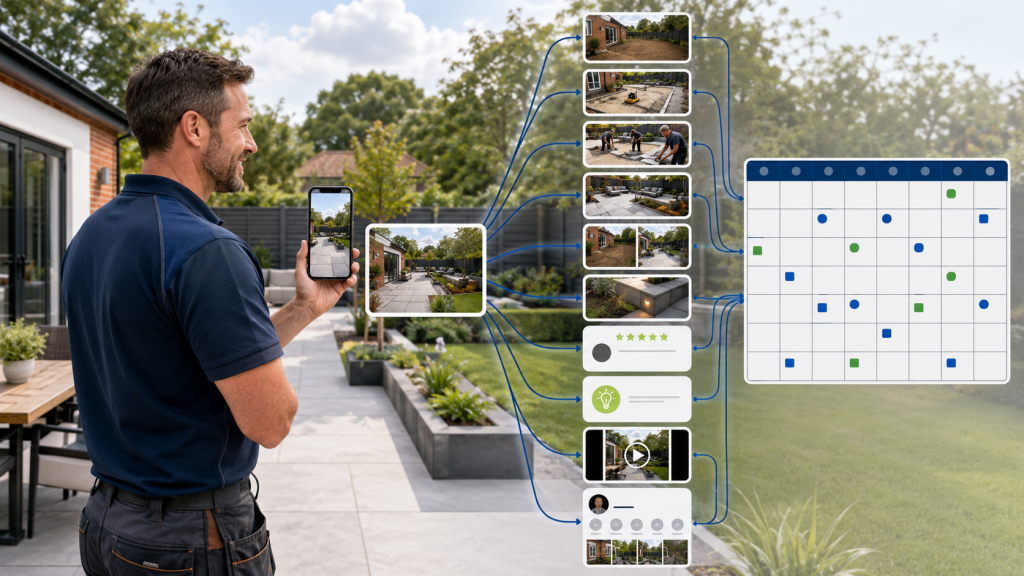
In reality, one properly recorded job can provide enough material for several weeks of content.
The key is to photograph different stages, identify several useful angles and avoid trying to include the entire story in one post.
One Job Is More Than One Post
A completed project contains several different stories.
These might include:
- The customer’s original problem
- The condition before work started
- The preparation involved
- The team completing the work
- Materials or equipment being used
- An unexpected challenge
- A specialist part of the process
- The completed result
- The visual transformation
- The customer’s feedback
- Advice relating to the service
- The location where the work took place
Each story can become an individual piece of content.
Instead of uploading every photograph in one large post, organise the material and use it gradually.
Start With the Right Photographs
Turning one job into several posts is much easier when the project has been recorded properly.
Try to collect:
Before photographs
Show the original condition and the problem the customer wanted to solve.
Progress photographs
Capture preparation, removal, installation and important stages that will eventually be hidden.
Team photographs
Show employees working naturally and using equipment safely.
Detail photographs
Record materials, finishes, equipment and examples of workmanship.
Completed photographs
Take wide, medium and close-up images of the finished result.
Short video clips
Record several steady clips before, during and after the work.
Customer feedback
Ask for an honest review or testimonial after completion.
Our guide to taking better job photographs explains how to collect this material using an ordinary smartphone.
Content Idea 1: Introduce the Customer’s Problem
The first post can explain why the customer contacted the business.
For example:
- A roof had developed a leak
- A driveway had become cracked and uneven
- An electrical installation required updating
- A customer wanted to modernise an old kitchen
- Damp was appearing on an internal wall
- A vehicle had developed a warning light
- A garden had become difficult to maintain
Use a clear before photograph and explain the situation in simple language.
Example:
This homeowner in Bournemouth contacted us after noticing water entering around an ageing section of their flat roof. The existing covering had deteriorated and several previous repairs were no longer keeping the area watertight.
This post introduces the project without revealing the finished result immediately.
Content Idea 2: Show the Work Beginning
The next post can focus on preparation.
Customers often see only the finished result and may not understand how much work takes place beforehand.
Preparation could include:
- Protecting the property
- Removing old materials
- Preparing the ground
- Setting up equipment
- Isolating services
- Cleaning the area
- Measuring and marking
- Delivering materials
- Completing safety checks
Example:
Preparation is one of the most important parts of any driveway installation. Before the new surface can be laid, the existing materials must be removed and the base properly prepared.
This type of content helps demonstrate the process and professionalism behind the work.
Content Idea 3: Share a Progress Update
Longer projects provide several opportunities for progress posts.
A useful update might show:
- The first stage completed
- New materials being installed
- The shape of the project becoming visible
- An important technical stage
- The team working
- Progress at the end of the week
Do not simply write “work in progress.”
Explain what is happening and why that stage matters.
Example:
The old roof covering has now been removed and the new deck is in position. Getting this stage right provides a sound, even base for the new roofing system.
This gives the audience useful context and demonstrates knowledge.
Content Idea 4: Highlight an Interesting Detail
A project may contain a feature that deserves its own post.
This could be:
- A specialist material
- A difficult corner or junction
- A bespoke finish
- Hidden preparation
- New technology
- An unusual piece of equipment
- A problem that required a different approach
- A small detail that improves the result
Example:
This channel drain was installed across the garage entrance to help direct surface water away from the property. It is a small detail within the wider driveway project, but an important part of managing drainage correctly.
Detail posts help show that the business understands more than the visible finished appearance.
Content Idea 5: Introduce the Team
If employees appear in the project photographs, use one image to introduce the people completing the work.
The post could explain:
- Who is working on the project
- Their role
- Their experience
- A relevant qualification
- The part of the work they specialise in
- How long they have worked with the company
Example:
Meet Dan, one of the experienced roofers working on our latest project. Dan has been part of the team for four years and is currently completing the detailed leadwork around the chimney.
This makes the business feel more familiar and gives customers confidence in the people who may visit their property.
Content Idea 6: Reveal the Finished Project
The completed-project post can bring the full story together.
Include:
- The service provided
- The general location
- The main work completed
- Any significant challenges
- The finished result
- A suitable call to action
Use the strongest finished photographs rather than every available image.
Example:
This new resin-bound driveway is now complete for a homeowner in Ringwood. The project included removing the old surface, preparing a new base, improving the drainage and installing the finished resin surface.
The completed post should clearly demonstrate the quality of the result.
Content Idea 7: Create a Before-and-After Comparison
The before-and-after post focuses on the visual transformation.
Use images taken from a similar:
- Position
- Height
- Angle
- Distance
- Orientation
The caption can be shorter because the comparison tells much of the story.
However, still explain what changed.
Example:
A complete transformation for this garden in Poole. The old, uneven space has been replaced with a new patio, raised planting areas and a practical pathway around the property.
This is different from the main completed-project post because it concentrates on the change rather than the complete process.
Content Idea 8: Answer a Related Customer Question
Every service is connected to questions potential customers regularly ask.
A roofing project could lead to posts such as:
- How do I know whether my roof is leaking?
- Can a flat roof be repaired?
- How long should a replacement take?
- What happens if it rains during the work?
A driveway installation could provide:
- Which driveway material is best?
- Does a new driveway need drainage?
- How long before the driveway can be used?
- How should resin be maintained?
A kitchen project could provide:
- How long does a kitchen installation take?
- Can the existing layout be changed?
- When should flooring be installed?
- Who coordinates the plumbing and electrics?
Use a relevant project photograph and answer one question clearly.
This turns completed work into helpful content rather than another direct promotion.
Content Idea 9: Explain the Service
A real project can be used to explain one of the company’s services.
For example:
Resin-bound driveways provide a smooth, decorative finish using aggregate mixed with a clear resin. The surface is hand-trowelled over a properly prepared base to create an even result.
The accompanying photograph proves that the business genuinely provides the service.
This is more credible than using an unrelated stock image.
Content Idea 10: Share the Customer’s Review
After completing the project, send the customer a direct link or QR code inviting them to leave an honest Google review.
If feedback is received, it can become another post.
You could create:
- A branded review graphic
- A simple review screenshot
- A project photograph with a short review excerpt
- A thank-you post
- A short video testimonial
Add context to the review.
Example:
Thank you to our customer in Christchurch for leaving this review following the completion of their new bathroom. We’re pleased they were happy with the communication from the team and the finished result.
Our guide explains how to get more genuine Google reviews using a simple and repeatable process.
Content Idea 11: Create a Short Reel
Several photographs and video clips can be edited into a short reel.
A basic project reel could include:
- The original condition
- Preparation beginning
- One or two progress stages
- The team working
- The finished result
- A final detail or wide shot
The video does not need to be long.
A concise transformation is normally easier to watch than several minutes of unedited footage.
Use real footage and avoid adding effects that distract from the work.
Content Idea 12: Add the Project to Google Business Profile
Google Business Profile is separate from traditional social media, but the project content can also be used there.
Add:
- Recent project photographs
- A concise project update
- The service provided
- The general location
- A relevant link where appropriate
This helps the profile reflect the current business rather than displaying only old images.
The update should be written naturally for potential customers rather than filled with repetitive locations and keywords.
Read our guide explaining why Google Business Profiles need regular updates.
How Can This Create a Month of Content?
If the business posts two or three times each week, one project could support the following schedule:
Week 1
Monday: The original customer problem
Wednesday: Preparation begins
Friday: Work-in-progress update
Week 2
Tuesday: Interesting project detail
Thursday: Meet the team
Week 3
Monday: Completed-project reveal
Wednesday: Before-and-after comparison
Friday: Short project reel
Week 4
Tuesday: Customer review
Thursday: Frequently asked question
Friday: Service explanation
The project could also be added to Google Business Profile during the month.
Not every job will provide all these opportunities, but even five or six strong posts can substantially extend the value of the content collected.
Will Posting About the Same Project Become Repetitive?
It can become repetitive if every post uses the same photograph and wording.
Avoid this by changing:
- The visual
- The stage of the project
- The purpose of the post
- The information provided
- The format
- The platform
- The call to action
For example:
- The problem post uses a before photograph
- The preparation post uses a work-in-progress image
- The team post concentrates on a person
- The finished post shows the final result
- The advice post answers a question
- The review post focuses on the customer experience
- The reel shows the complete transformation
The project remains the same, but each post provides something different.
Do You Need to Publish Everything Consecutively?
No.
The content can be mixed with updates from other projects and other areas of the business.
A varied schedule may include:
- Project A progress
- A customer review
- Project B completion
- Advice connected to Project A
- A team introduction
- Project C before-and-after
- Project A reel
This prevents the page from feeling dominated by one job.
It also allows completed work to remain useful for longer.
Can Old Projects Be Used?
Yes, provided the content remains accurate and relevant.
An older project may be particularly useful when:
- The photographs clearly demonstrate an important service
- The project took place in a key service area
- The original post received limited attention
- New followers may not have seen it
- The business is experiencing a quieter period
- The content can be presented from a different angle
- The advice remains current
Avoid pretending that an old project was completed recently.
It can be described as:
- A previous project
- A look back at one of our completed jobs
- An example from our project portfolio
- One of our favourite transformations
- A project completed for a customer in [location]
Transparency maintains trust.
Store Content Properly
Project content becomes much easier to reuse when it is organised.
Create a folder for each job containing:
- Before photographs
- Progress photographs
- Finished photographs
- Videos
- Project information
- Customer feedback
- Permission notes
- Published posts
Use a clear folder name, such as:
2026 – Ringwood – Resin Driveway
Avoid leaving everything mixed together in one phone gallery.
A simple content library can prevent valuable project photographs from being lost and makes planning quieter weeks much easier.
Keep Basic Project Notes
Photographs do not always explain what happened.
Store a few notes with each project:
- Service
- General location
- Customer’s original problem
- Work completed
- Materials used
- Challenges resolved
- Team members involved
- Completion date
- Customer review
- Anything that should remain private
A short WhatsApp message or voice note may contain enough information.
Without this context, someone reviewing the photographs months later may not remember the details required to write an accurate post.
Obtain Permission Where Necessary
Consider privacy before publishing customer projects.
Avoid showing:
- Full residential addresses
- House numbers
- Vehicle registrations
- Personal documents
- Family photographs
- Security systems
- Children
- Customers who have not agreed to appear
- Valuable possessions
- Confidential commercial information
Use the town or general location rather than a precise address.
If people, private areas or testimonials will be included, obtain appropriate permission.
Adapt the Content for Each Platform
One project can be shared across several platforms without using exactly the same presentation everywhere.
Use a conversational project summary, several photographs and a relevant website link.
Prioritise the strongest visual, a concise caption, carousel or reel, and suitable hashtags.
Focus on the project requirements, team expertise, commercial value or problem solved.
TikTok
Use vertical progress clips, transformations and short explanations.
X
Share a shorter project update, useful advice or timely progress photograph.
Google Business Profile
Provide a concise service update with clear project photographs and accurate information.
The idea remains the same, but the format suits the platform.
One Piece of Content Can Have Several Purposes
A project post can help the business:
- Demonstrate experience
- Show recent activity
- Build a portfolio
- Explain a service
- Introduce the team
- Answer a customer question
- Provide useful advice
- Highlight a location
- Share a review
- Direct people to the website
- Keep Google Business Profile current
This is why one properly recorded job is so valuable.
The business is not simply collecting photographs. It is building a library of evidence that demonstrates what it does.
A Simple Checklist for Every Project
Before leaving the job, collect:
- Before photographs
- Progress photographs
- Finished photographs
- Wide and close-up images
- Portrait and landscape versions
- Several short video clips
- A photograph of the team
- Project details
- Customer permission where needed
- An honest review request
This gives the person managing the content enough material to create several meaningful updates.
Let Project Presence UK Create More From Every Job
Project Presence UK manages the complete online presence of local businesses from £300 per month.
You do not need to create a new post every day.
Simply send your project photographs, short video clips and a few details into a WhatsApp group. We then:
- Organise the project content
- Select and edit the strongest photographs
- Write several different captions
- Prepare before-and-after comparisons
- Create up to two edited reels per month
- Adapt content for different platforms
- Schedule two to three posts per week
- Update your Google Business Profile
- Monitor and respond to Google reviews
- Store content for future use
We turn the work your business already completes into a consistent and professional online presence.
Contact Project Presence UK to tell us about your business and find out how the service works.