
Google reviews can play an important part in how potential customers assess a local business.
Someone comparing several tradespeople or service providers may look at the number of reviews, the overall rating, how recent the feedback is and how the business responds to its customers.
A company could provide an excellent service but receive very few reviews simply because it never asks for them. Another business may have developed a straightforward process that reminds every genuine customer to share their experience.
The difference is often not the quality of the work. It is the process used after the work has been completed.
Why Are Google Reviews Important?
Google reviews appear alongside a business’s profile on Google Search and Google Maps.
They can help potential customers learn about:
- The quality of the work
- Reliability
- Communication
- Professionalism
- Customer service
- The services provided
- The areas covered
- How the business handles problems
Reviews can also provide the business with useful feedback.
Google explains that reviews can help a business stand out and give potential customers useful information. However, reviews must reflect genuine customer experiences and should never be purchased or manipulated. You can read Google’s official guidance on getting more reviews.
Start by Providing a Review-Worthy Service
A review strategy cannot compensate for poor service.
Before asking customers for feedback, consider the complete experience:
- Was the enquiry answered promptly?
- Did the business arrive when expected?
- Was the quotation clear?
- Did the team communicate throughout the work?
- Was the property treated respectfully?
- Was the work completed to the expected standard?
- Was the site left clean?
- Did the customer understand what had been completed?
- Were any problems handled professionally?
Customers are more likely to leave positive feedback when the complete experience has been straightforward.
The finished work is important, but communication, punctuality and professionalism may be equally memorable.
Create a Direct Google Review Link
The easier the process is, the more likely a customer is to complete it.
Avoid asking someone to:
- Open Google
- Search for the business
- Find the correct profile
- Open the reviews
- Work out where to leave one
Instead, send them a direct review link.
Google currently allows eligible businesses to create and share a review link or QR code from their Business Profile.
To find it:
- Sign in to the Google account connected to the business
- Open your Google Business Profile
- Select Read reviews
- Select Get more reviews
- Copy the review link or download the QR code
Google states that the QR code is currently generated through a computer browser rather than a mobile device. Its guidance also suggests sharing the link through email, WhatsApp and Facebook or including the QR code on receipts and printed material. See Google’s instructions for creating a review link or QR code.
Test the link before sending it to customers.
It should open the correct business profile and take the customer directly to the review process.
Ask at the Right Time
Timing can make a significant difference.
For many trades and service businesses, the best time to ask is shortly after:
- The project has been completed
- The customer has inspected the work
- The final handover has taken place
- The customer has expressed that they are happy
- A problem has been successfully resolved
- The final invoice has been paid
- A positive conversation has taken place
Do not wait several months. The details of the experience may no longer be fresh in the customer’s mind.
However, avoid putting pressure on the customer while they are still standing with the team. A short message sent later that day or the following morning can feel more natural.
Make Review Requests Part of Your Process
The most effective review strategies are repeatable.
Do not rely on the business owner remembering to ask whenever they happen to think about it.
Add the review request to the normal customer process:
- Complete the work
- Confirm that the customer is satisfied
- Send the final paperwork
- Send the review request
- Record whether the request has been sent
- Thank the customer if they leave feedback
- Respond publicly to the review
This process could be managed through:
- A job-management system
- A shared spreadsheet
- A customer relationship management system
- An invoicing platform
- A calendar reminder
- A WhatsApp template
- A simple completed-jobs list
The system does not need to be complicated. It simply needs to prevent good customers from being forgotten.
Ask Every Genuine Customer Fairly
Businesses should not attempt to manipulate their rating by only inviting customers who promise to leave five stars.
Google describes rating manipulation as attempting to influence a location’s rating through fake or misleading activity, including pressuring customers for particular ratings or orchestrating campaigns designed to unfairly alter a rating. Read Google’s rating-manipulation policy.
The safest approach is to invite genuine customers to leave honest feedback about their experience.
Do not:
- Tell customers they must leave five stars
- Ask them to include specific keywords
- Write the review for them
- Pressure them to publish it immediately
- Ask employees, relatives or suppliers to pretend to be customers
- Purchase reviews
- Arrange fake-review exchanges
- Discourage genuine negative feedback
- Ask someone to remove a negative review in exchange for a benefit
A genuine mix of detailed customer experiences is more credible than a profile filled with suspicious, repetitive reviews.
Use WhatsApp to Request Reviews
WhatsApp is often one of the easiest options for local businesses because it may already be the main way they communicate with customers.
Keep the message friendly and concise.
Example:
Hi [Name], thank you again for choosing [Business Name]. If you have a moment, we’d really appreciate an honest Google review about your experience. It helps other local customers learn more about our work: [Review Link]
Avoid sending a long paragraph or repeatedly chasing the customer.
The direct link should be easy to identify and open.
Request Reviews by Email
Email may be more appropriate for commercial customers, larger projects or businesses that already send completion paperwork electronically.
Example:
Hi [Name],
Thank you for choosing [Business Name] for your recent [service or project].
If you have a moment, we would appreciate an honest Google review about your experience. Your feedback helps us improve and gives other customers a better understanding of the work we provide.
You can leave a review here: [Review Link]
Thank you for your time.
You could include the request beneath the main completion message or send it separately after the customer has had an opportunity to inspect the work.
Ask in Person
A verbal request can feel natural when the customer is clearly pleased with the result.
For example:
We’re really pleased that you’re happy with the work. Would you mind leaving us an honest Google review when you have a spare minute? I’ll send you a direct link so it’s easy to find.
Follow the conversation with a message containing the link.
Do not expect the customer to search for the business themselves or remember the request several days later.
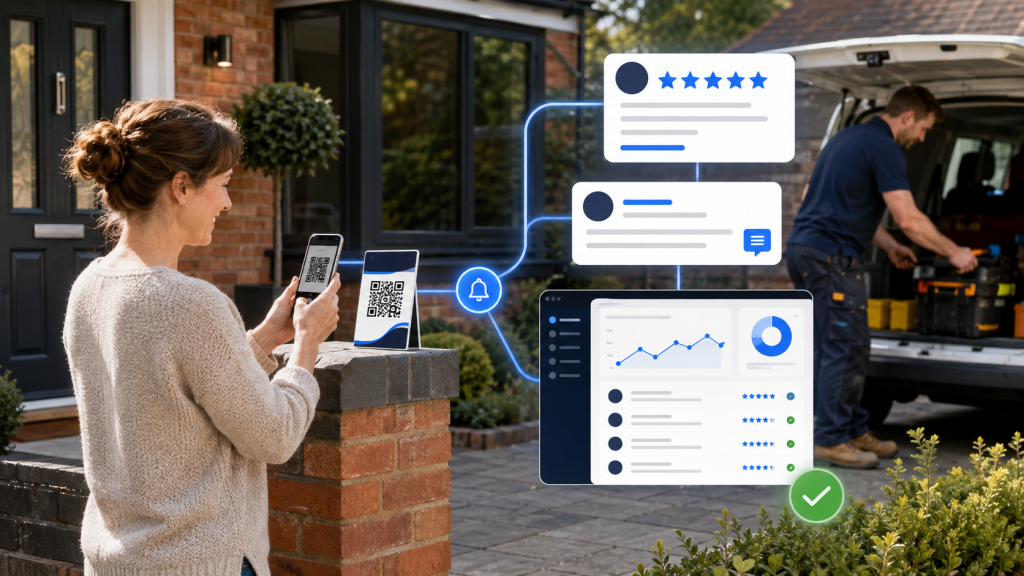
Use a Google Review QR Code
A QR code allows someone to scan the code with their phone and open the review page.
It can be added to:
- Printed invoices
- Completion packs
- Business cards
- Thank-you cards
- Reception desks
- Shop counters
- Vehicle handover documents
- Product packaging
- Project sign-off sheets
- Staff phone wallpapers
- Printed leave-behind cards
Place a simple instruction near the code, such as:
Scan to leave an honest Google review.
Always test the QR code using several phones before printing a large quantity of material.
Make sure:
- It opens the correct profile
- It is large enough to scan
- There is enough contrast
- It is not distorted
- The surrounding design is not cluttered
- Customers understand what the code does
Create a Review Phone Wallpaper for Staff
For teams working at customer properties, a review wallpaper can provide a simple portable option.
The wallpaper could contain:
- The business logo
- A short review request
- The Google review QR code
When a customer asks how to leave feedback, the team member can display the wallpaper for them to scan.
This is particularly useful when staff do not carry printed cards.
The customer should still be free to leave an honest review later. Avoid standing over them or making them feel required to complete it immediately.
Provide the Team With a Simple Script
Employees may avoid asking for reviews because they feel uncomfortable or do not know what to say.
Provide one simple sentence:
If you’re happy with everything, we’d really appreciate an honest Google review. I can send you a direct link if that would help.
The request should sound natural and should never pressure the customer to leave a particular score.
Explain to the team:
- When to ask
- How the link will be sent
- Where to record the request
- What they should not say
- Who will monitor new reviews
- Who will respond to customer feedback
A consistent process is more effective than occasionally asking staff to “get some more reviews.”
Can You Send a Reminder?
A customer may intend to leave a review and simply forget.
One polite reminder may be appropriate, particularly when the customer previously agreed to provide feedback.
Example:
Hi [Name], just a quick reminder in case our previous message became lost. If you have a moment, we’d be grateful for an honest review of the work we completed: [Review Link]. No problem at all if you’re busy.
Avoid sending repeated messages.
The objective is to make leaving feedback convenient, not to frustrate the customer.
Should You Offer a Discount or Prize for Reviews?
No.
Google states that businesses must not offer payments, discounts, free goods, free services or other incentives in exchange for reviews. This applies to asking for a new review as well as asking someone to change or remove an existing one. Incentivised feedback may be treated as fake engagement and removed. See Google’s policies covering incentivised or biased reviews.
Avoid offers such as:
- Leave a review for 10% off
- Review us to enter a prize draw
- Receive a free product for five stars
- Change your review and we will refund you
- Remove the negative review for a discount
Ask for genuine, voluntary feedback instead.
Do Not Tell Customers What to Write
You can make the process easier without dictating the content.
It is reasonable to say:
We’d appreciate an honest review about your experience.
Avoid providing a pre-written review for the customer to paste into Google.
If someone asks what information would be useful, encourage them to describe the experience in their own words.
A genuine review may naturally mention:
- The service provided
- Communication
- Reliability
- The finished result
- The team
- The general location
- Whether they would recommend the business
The wording should remain the customer’s choice.
Respond to New Reviews
Receiving the review is not the end of the process.
Google recommends replying to reviews to demonstrate that customer feedback matters. Replies are public and appear beneath the customer’s review once approved. Google advises businesses to keep responses professional, relevant, conversational and concise rather than posting the same promotional reply every time. See its guidance on managing and replying to customer reviews.
A useful positive-review response could:
- Thank the customer
- Refer naturally to the service
- Mention the general area where appropriate
- Recognise a team member
- Reinforce one detail from the review
- Invite the customer to return if relevant
Example:
Thank you for taking the time to leave us a review, Sarah. We’re pleased you’re happy with the new driveway and the service from our team. It was a pleasure completing the project for you in Ringwood.
Avoid filling replies with unnatural lists of services and locations purely for search engines.
The response should primarily be written for the customer.
How Should You Handle Negative Reviews?
A negative review should not automatically receive an angry response or be ignored.
First, establish:
- Whether the reviewer is a genuine customer
- What happened
- Whether the issue has already been reported
- Whether the business made a mistake
- Whether the review contains private information
- Whether the review violates a Google policy
A professional public response may:
- Acknowledge the concern
- Apologise where appropriate
- Explain that the business wants to investigate
- Invite the customer to continue the conversation privately
- Avoid revealing confidential details
Example:
Hi [Name], thank you for bringing this to our attention. We’re sorry to hear that your experience did not meet expectations. We would like to review what happened and discuss this with you directly. Please contact us on [number] so we can investigate further.
Do not argue publicly or publish private customer details.
Google allows businesses to report reviews that breach its policies, but it explains that a review is not eligible for removal merely because the business disagrees with it. Read Google’s guidance on reporting inappropriate reviews.
Share Your Reviews Elsewhere
A good Google review can also become useful social media content.
Subject to appropriate privacy and presentation, reviews can be shared through:
- Facebook posts
- Instagram graphics
- LinkedIn updates
- Website testimonials
- Project case studies
- Monthly review summaries
- Team-recognition posts
Add context when sharing the feedback.
For example, explain which service was provided and thank the customer rather than publishing an unexplained screenshot.
Google also provides a way to create a shareable link to an individual customer review from Google Maps.
Set a Realistic Review Goal
A review goal can help the business measure whether its request process is working.
The objective should be to consistently invite genuine customers to share honest feedback—not to pressure staff or customers into producing a particular number or star rating.
A realistic internal goal might be based on:
- The number of completed jobs
- How many customers are normally contacted
- The current number of reviews
- The size of the team
- The type of service
- How often customers use the business
A company completing five larger projects per month will have a different opportunity from a garage serving dozens of customers each week.
Monitor:
- How many eligible customers were invited
- Which request method was used
- Whether the link works correctly
- How quickly new reviews are acknowledged
- Whether review replies are being completed
Focus on improving the process rather than manipulating the result.
How Many Google Reviews Does a Business Need?
There is no single number suitable for every business.
The profile should be considered in context:
- How many reviews do comparable local businesses have?
- How recent are your reviews?
- Do they describe a range of services?
- Do they appear genuine and detailed?
- Does the business respond?
- Is feedback arriving consistently?
- Does the profile reflect the current business?
A steady flow of recent customer experiences can be more reassuring than a large number collected several years ago followed by complete inactivity.
Common Reasons Businesses Do Not Receive More Reviews
Businesses often receive fewer reviews because:
- They never ask
- The request comes too late
- Customers have to find the profile themselves
- The review link is incorrect
- Employees do not know when to ask
- There is no follow-up process
- Review requests are not recorded
- The message is too long
- The customer feels pressured
- The business only asks occasionally
- Nobody responds to existing reviews
Most of these problems can be resolved with a straightforward process.
A Simple Google Review Process
A practical process for a local business could be:
Step 1: Complete the work
Make sure the customer has received the agreed service and has had an opportunity to raise any concerns.
Step 2: Ask for honest feedback
Ask naturally during the handover or final conversation.
Step 3: Send the direct link
Send a short WhatsApp message or email shortly after completion.
Step 4: Record the request
Mark the customer as contacted so requests are not duplicated.
Step 5: Send one polite reminder if appropriate
Do not repeatedly chase the customer.
Step 6: Monitor new reviews
Check the profile regularly or ensure notifications are enabled.
Step 7: Respond professionally
Write a concise and relevant response rather than copying an identical template.
Step 8: Reuse suitable feedback
Turn strong reviews into social media posts and website testimonials where appropriate.
Let Project Presence UK Manage Your Review Strategy
Project Presence UK manages the complete online presence of local businesses from £300 per month.
As part of the service, we can help your business:
- Review its current Google feedback
- Create a direct review link and QR code
- Develop a simple request process
- Produce branded QR-code materials
- Create staff phone wallpapers
- Prepare review-request message templates
- Monitor new customer reviews
- Write professional review responses
- Turn suitable feedback into social media content
- Agree a realistic review objective
- Keep your Google Business Profile active and accurate
You continue providing the service and collecting genuine customer feedback. We help organise the process and ensure new reviews are monitored and acknowledged.
Contact Project Presence UK to tell us about your business and discuss your current online presence.